


 検索
検索よくあるご質問
質問
How to carry out a test page printing to check whether the printer is available or not ? (FAQ No.01208)
回答
When you would like to check if a printing is available or not in cases like when you installed a new printer driver, you can carry out a test page printing according to the following procedure.
Operation Procedure
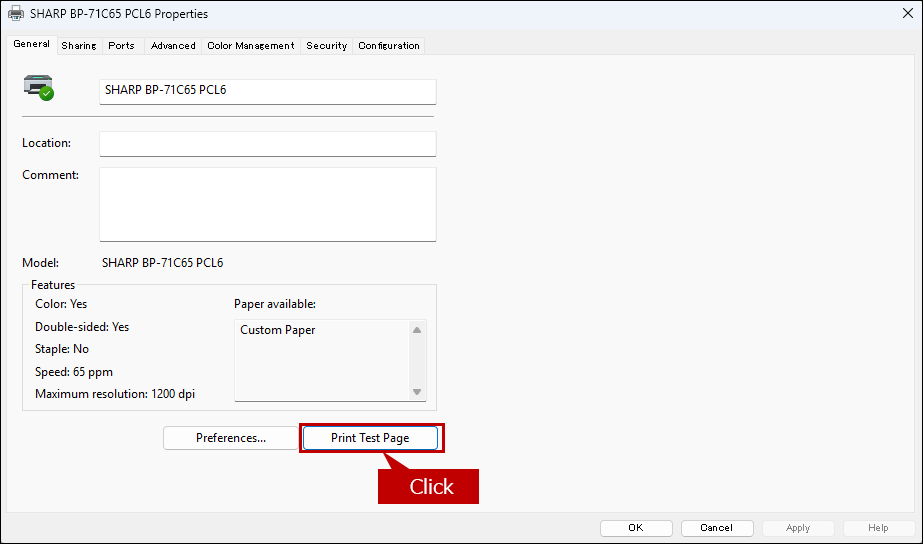
1. Click [Printer Properties].
2. Carry Out a Test Page Printing.
Click the [Print Test Page] button.
The screen layout of the [Printer Properties] varies depending on the products and drivers. The screen shot below is the Property screen of SPDL2-c driver for MX-3650FN.
3. Check on the Printout of the Test Page Printing.
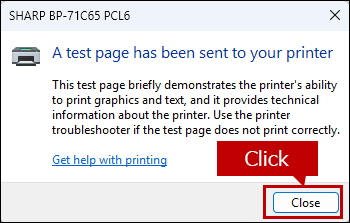
When the Test Page Printing is completed, click the [Close] button on the dialog box and check on the printout.
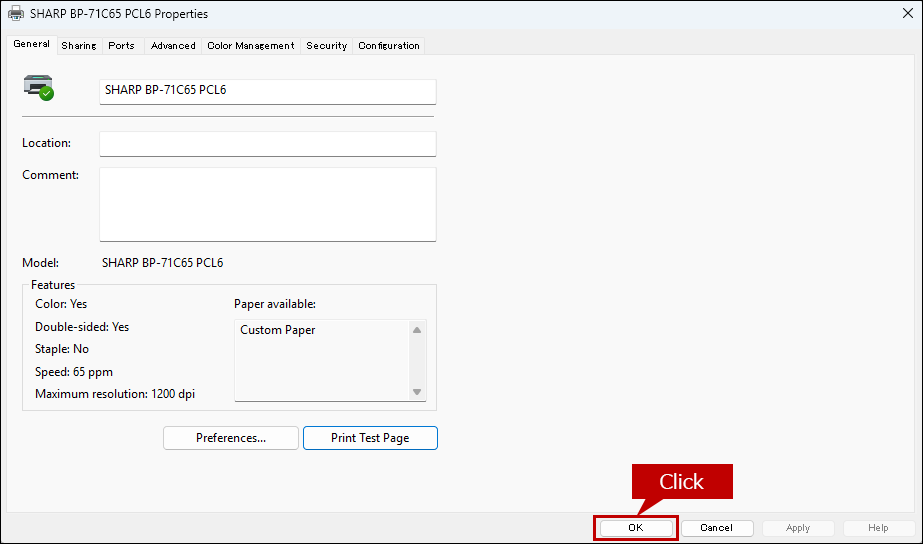
4. Complete the Test Page Printing.
Click the [OK] button on the Printer Property screen to end the Test Page Printing.
関連キーワード
FAQJPID_01208 / Test printing / Print Test Page / Test / Print / Check
各製品のよくあるご質問トップに戻る
BP-40C26 / BP-40C36 / BP-50C26 / BP-50C31 / BP-50C36 / BP-50C45 / BP-50C55 / BP-50C65 / BP-50M26 / BP-50M31 / BP-50M36 / BP-50M45 / BP-50M55 / BP-50M65 / BP-51C26 / BP-51C31 / BP-51C36 / BP-51C45 / BP-51C55 / BP-51C65 / BP-51M26 / BP-51M31 / BP-51M36 / BP-51M45 / BP-51M55 / BP-51M65 / BP-55C26 / BP-56C26 / BP-60C26 / BP-60C31 / BP-60C36 / BP-60C45 / BP-61C31 / BP-61C36 / BP-61C45 / BP-70C26 / BP-70C31 / BP-70C36 / BP-70C45 / BP-70C55 / BP-70C65 / BP-70M31 / BP-70M36 / BP-70M45 / BP-70M55 / BP-70M65 / BP-71C31 / BP-71C36 / BP-71C45 / BP-71C55 / BP-71C65 / BP-71M31 / BP-71M36 / BP-71M45 / BP-71M55 / BP-71M65 / BP-80C70 / BP-80C80更新日:2025年10月22日