TRAY 1
A maximum of 500 sheets (BP-22M22, BP-22M24 or BP-22M24L:
250 sheets) of paper from size A5R to A3 (5-1/2" x 8-1/2"R to 11"
x 17") can be loaded into tray 1.
If you loaded paper of a different type or size
from the paper previously loaded, be sure to check the settings
in "Settings (administrator)". Incorrect setting affects automatic
paper selection action. It may cause print failure, printing on
paper of a wrong size or type or paper misfeeds.
Caution
Do not place heavy objects on the tray or press
down on the tray.
To
check the type and size of paper:
In the Web page, select [Status] → [Machine Identification]
→ [Paper Input Tray Status].
To set
the type and size of paper:
[Tray Settings] in the home screen.
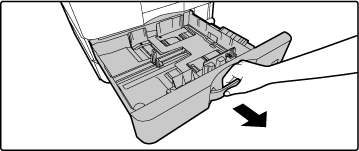
Pull out the paper tray.
Gently pull the tray out until it stops.
If you want to re-load the same sheet of paper, proceed
to Step 3.
To load paper of a different size, proceed to the next
step.
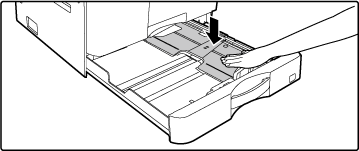
For BP-22M22/BP-22M24/BP-22M24L, push the centre
of the pressure plate down until it locks into place.
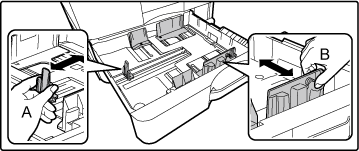
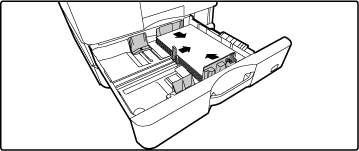
Adjust guide plates A and B to match the longitudinal
and transversal dimensions of the paper to be loaded.
The guide plates A and B are slidable. Squeeze the separator
plate lever and slide to the desired paper size.
Fan the paper.
Fan the paper well before loading it. If the paper is
not fanned, multiple sheets may feed at once and cause a misfeed.
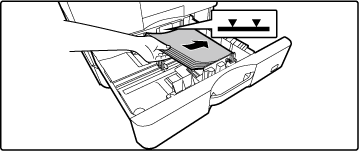
Insert the paper into the tray.
Load the paper with the print side facing up.
For BP-22M22/BP-22M24/BP-22M24L, place the paper
under the roller on the right side of the tray.
- If
a paper misfeed occurs, turn the paper over and/or around, and reload.
- If the
paper is curled, fix the curl before loading the paper.
- Adjust
the divider plate so that there is no gap between the paper and
divider plate.
- Do not
add paper.
- Do not
load the paper as shown below.
- To
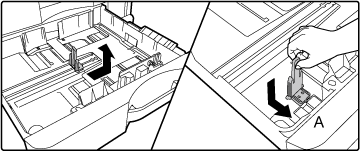
load 11" x 17" paper
Remove
the divider plate.Move the divider plate all the way over to the
paper feed opening side (right side), and pull up to remove. Insert
the removed divider plate into A.
- The
stack must not be higher than the indicator line (Maximum of 500
sheets (BP-22M22, BP-22M24 or BP-22M24L: 250 sheets)).
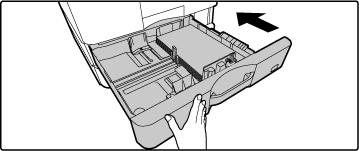
Gently push the paper tray into the machine.
Push the tray firmly all the way into the machine slowly.
Forcefully inserting the tray may cause the paper to
be skewed and misfeed.