This section describes the steps for setting the original
on the document glass.
Warning
Allowed original sizes
| Minimum original size | Maximum original size |
|---|---|
|
Standard size A6R: 210 mm (longitudinal) × 148 mm 5-1/2" (longitudinal) × 8-1/2" (transversal) Non-standard size (Minimum size that can be specified manually) 25 mm (longitudinal) × 25 mm (transversal) 1" (longitudinal) × 1" (transversal) |
Standard size 297 mm (longitudinal) × 420 mm (transversal) or A3 11" (longitudinal) × 17" (transversal) Non-standard size (Maximum size that can be specified manually) 297 mm (longitudinal) × 432 mm (transversal) 11-5/8" (longitudinal) × 17" (transversal) |
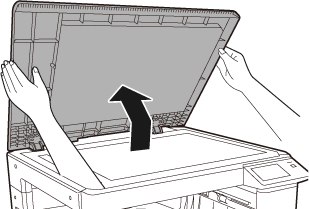
Open the automatic document feeder.
Load the paper with the print side facing down.
Place the original face down and align the top left corner of the original with back left (at the tip of the mark ) of the document glass.
.png)
Close the automatic document feeder or document cover.
After placing the original, close the automatic document feeder or document cover. If the unit is left open, parts outside of the original will be copied in black, causing excessive use of toner.(BP-22M24L)
To copy large originals like newspapers, remove the document
cover. To remove it, open the document cover and lift it at a slightly
backward angle. To replace the cover, do the reverse.
Version 01a / bp22m31_usr_01a_en

