To ensure that the machine continues to provide top
quality performance, periodically clean the machine.
Warning
Do not use a flammable spray to clean the machine. If gas from the spray comes in contact with hot electrical components or the fusing unit inside the machine, fire or electrical shock may result.Caution
Wipe the parts with a clean,
soft cloth.
If necessary, moisten the cloth with water or a small amount
of neutral detergent. After that, wipe with a clean dry cloth.
Examples
of lines in the image

Document
glass
.png)
Document
backplate sheet
.png)
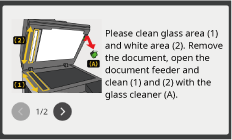
If black or white lines appear on images scanned using
the automatic document feeder, or if the following message appears,
clean the scanning area (the thin long glass next to the document
glass).
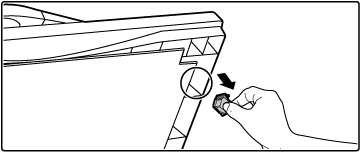
Open the automatic document feeder and remove the glass cleaner.
Clean the document scanning area on the document glass with the glass cleaner.

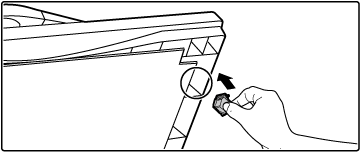
Replace the glass cleaner.
If paper misfeeds frequently occur when
feeding envelopes or heavy paper through the bypass tray, wipe the
surface of the feed roller with a clean soft cloth moistened with
water or a neutral detergent.

(Except
for BP-22M24L)
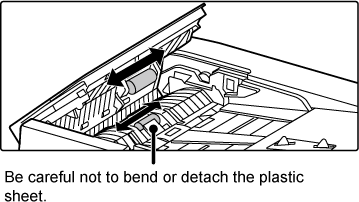
If lines or other dirt appear on the scanned original when
the automatic document feeder is used, wipe the surface of the roller
with a clean soft cloth moistened with water.
(Except
for BP-22M28/BP-22M31)
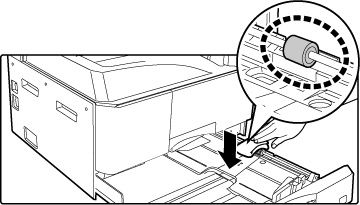
If the paper in tray frequently misfeeds, press down the centre
of the pressure plate until it locks, and wipe the surface of the
feed roller with a clean, soft cloth moistened with water.
Version 01a / bp22m31_usr_01a_en

