The output tray is automatically selected based on the
output function you set. If Z-Fold, Half Fold, or Punch is selected, you
can select the upper, middle or lower tray for the output tray.
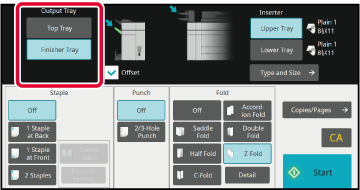
Tap the [Top Tray] or [Finisher Tray] key in "Output Tray"
and select the output tray you require.
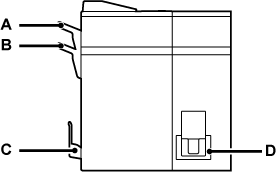
Relation between output function and output tray
An output tray is automatically selected as shown below based
on the output function you set. Depending on the output function
that is originally deselected, it may be deselected if you tap the
[Top Tray] or [Finisher Tray] key to change the output tray.
For example, if you tap the [Top Tray] or [Finisher Tray]
key with "Saddle Stitch" selected, the setting for "Saddle Stitch" is
canceled.
| Output function | Deliver to | |
|---|---|---|
|
Staple |
Finisher tray (B) |
 |
|
Z-Fold/Half Fold/Punch |
Top tray (A), Finisher tray (B) |
|
|
Saddle Stitch/Saddle Fold |
Saddle Stitch tray (C) |
|
|
C-Fold/Accordion Fold/Double Fold |
Folding Unit Tray (D) |
|
Version 02b / bp80c80_usr_02b_us

