.png)
To indicate the landscape setting, "R" is
added to the end of the name of a paper size enabled for both landscape
and portrait settings.
| Paper that can be set either in the portrait or landscape orientation |
Paper that can only be set in the landscape orientation |
|
|---|---|---|
|
8-1/2" x 11", A4, B5 |
13” x 19”, 12" x 18", 11" x 17", 8-1/2" x 14", 8-1/2" x 13", SRA3, A3W, A3, B4, SRA4 |
|
|
Paper set in the landscape orientation 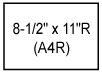 |
Paper set in the portrait orientation 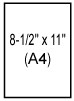 |
Can be placed only in the landscape orientation 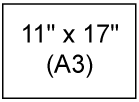 |
This section describes paper types that
can be used and those that cannot be used.
All types of paper other than plain paper are referred to
as special media.
Caution
Specifications of plain
paper, heavy paper and thin paper
|
Plain Paper * |
Plain Paper 1 |
16 lbs. bond to 24 lbs. bond (60 g/m2 to 89 g/m2) |
|---|---|---|
|
Plain Paper 2 |
24 lbs. bond to 28 lbs. bond (90 g/m2 to 105 g/m2) |
|
|
Heavy paper |
Heavy paper 1 |
28 lbs. bond to 65 lbs. cover (106 g/m2 to 176 g/m2) |
|
Heavy paper 2 |
65 lbs. cover to 80 lbs. cover (177 g/m2 to 220 g/m2) |
|
|
Heavy paper 3 |
80 lbs. cover to 140 lbs. index (221 g/m2 to 256 g/m2) |
|
|
Heavy paper 4 |
140 lbs. index to 110 lbs. cover (257 g/m 2 to 300 g/m2) |
|
|
Thin paper |
13 lbs to 16 lbs (55 g/m2 to 59 g/m2) |
|
* If the paper that you normally use is Recycled, Pre-Punched, Pre-Printed, Letter Head, Color, or User Type 1 to 9, set an appropriate paper weight in “Settings” – [System Settings] → [Common Settings] → [Paper Settings] → [Paper Tray Settings] → [Paper Weight].
* Recycled paper includes 100% post-consumer recycled paper that meets the standard EN12281:2002 and similar quality standard.
5-1/2" x 8-1/2"R, 8-1/2" x 11", 8-1/2" x 11"R, 8-1/2"
x 13", 8-1/2" x 13-2/5", 8-1/2" x 14", 11" x 17", A4, A4R
|
Paper Type |
Plain, Recycled, Color, Letter Head, Pre-Printed, Punched, Heavy Paper (28 lbs. bond (106 g/m2) to 110 lbs. cover (300 g/m2)), Embossed, Glossy paper |
|---|---|
|
Paper Size |
13” x 19”, 12" x 18", 11" x 17", 8-1/2" x 14", 8-1/2" x 13-1/2", 8-1/2" x 13-2/5", 8-1/2" x 13", 8-1/2" x 11", 8-1/2" x 11"R, 5-1/2" x 8-1/2"R, SRA3, A3W, A3, B4, SRA4, A4, A4R, B5, B5R, A5R |
Types of paper that can
be set in each tray
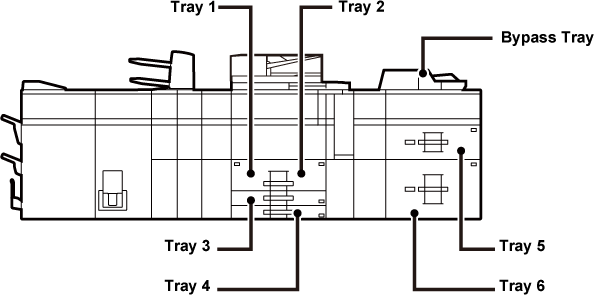
| Tray 1/2 | Tray 3 | Tray 4 | Bypass tray |
Tray 5 Large capacity tray (BP-LC12/ MX-LCX3 N) |
Large capacity trays Tray 5/6 |
Bypass tray (for large capacity trays) |
Inserter (Upper / Lower) |
|
|---|---|---|---|---|---|---|---|---|
|
Thin paper*1 |
- |
- |
- |
Yes |
- |
Yes |
Yes |
Yes |
|
Plain paper 1 (16 to 24 lbs bond (60 to 89 g/m2)) |
Yes |
Yes |
Yes |
Yes |
Yes |
Yes |
Yes |
Yes |
|
Plain paper 2 (24 to 28 lbs bond (90 to 105 g/m2)) |
Yes |
Yes |
Yes |
Yes |
Yes |
Yes |
Yes |
Yes |
|
Recycled paper |
Yes |
Yes |
Yes |
Yes |
Yes |
Yes |
Yes |
Yes |
|
Color |
Yes |
Yes |
Yes |
Yes |
Yes |
Yes |
Yes |
Yes |
|
Letter head |
Yes |
Yes |
Yes |
Yes |
Yes |
Yes |
Yes |
Yes |
|
Pre-printed |
Yes |
Yes |
Yes |
Yes |
Yes |
Yes |
Yes |
Yes |
|
Pre-punched |
Yes |
Yes |
Yes |
Yes |
Yes |
Yes |
Yes |
Yes |
|
Heavy paper 1: 28 lbs bond to 65 lbs cover (106 g/m2 to 176 g/m2) |
- |
Yes |
Yes |
Yes |
Yes |
Yes |
Yes |
Yes |
|
Heavy paper 2: 65 lbs cover to 80 lbs cover (177 g/m2 to 220 g/m2) |
- |
Yes |
Yes |
Yes |
Yes |
Yes |
Yes |
Yes |
|
Heavy paper 3: 80 lbs cover to 140 lbs index (221 g/m2 to 256 g/m2) |
- |
Yes |
Yes |
Yes |
- |
Yes |
- |
Yes |
|
Heavy paper 4: 140 lbs index to 110 lbs cover (257 g/m2 to 300 g/m2) |
- |
Yes |
Yes |
Yes |
- |
Yes |
- |
Yes |
|
Embossed |
- |
- |
Yes |
Yes |
- |
Yes |
- |
Yes |
|
- |
- |
Yes*4 |
Yes |
- |
- |
Yes |
- |
|
|
Tab paper |
- |
- |
Yes |
Yes |
- |
Yes |
Yes |
Yes |
|
Transparency film |
- |
- |
Yes |
Yes |
- |
Yes |
Yes |
- |
|
Labels |
- |
- |
Yes |
Yes |
- |
Yes |
- |
- |
|
Glossy paper |
- |
- |
- |
Yes |
- |
Yes |
- |
Yes |
*1 Thin paper of A6R size cannot be used.
*2 For envelopes that can be used, see “Paper Tray Settings".
*3 Some envelopes may not be usable due to the shape of the flap or the type of envelope. Depending on the countries or regions, envelopes may not be available.
*4 Tray 4 can only be loaded with Com9, Com10, and Monarch envelopes. drawer is installed
Setting
orientation of the print side
The setting orientation varies for the print side of paper,
depending on the tray used. For "Letter Head" and "Pre-Printed", set
the paper in the reverse orientation.
Place with the print side facing the direction indicated below.
| Tray | In normal status | With letter head or pre-printed paper set |
|---|---|---|
|
Trays 1 - 4 |
Facing up |
Facing down |
|
Bypass tray, Tray 5, Tray 6 |
Facing down |
Facing up |
Version 02b / bp80c80_usr_02b_us

