This includes the offset function that outputs sorted
paper while staggering each set of paper and the staple sort function that
staples each set of prints.
Installing an optional hole punch module allows you to punch
holes in printed paper.
.png)
Stapled and offset
output is delivered to this tray.
The tray is slidable. Extend the tray for printing
on large-size paper (larger than 8-1/2" × 11" (A4)).
Output paper that
will not be offset in this tray.
The tray is slidable. Extend the tray for printing
on large-size paper (larger than 8-1/2" × 11" (A4)).
When outputting long paper, install the long paper
exit tray for the peripheral device.
Open this cover to
replace the staple cartridge or remove a staple jam.
The finisher (large stacker) requires the
following staple cartridge:
Staple cartridge (approx. 5000 staples per cartridge × five
cartridges)
BP-SC11
.png)
When the staple cartridge has 20% remaining
staples, a message will appear on the operation panel. Prepare a
staple
cartridge for replacement. When the staple in the staple cartridge
runs out, follow the operation procedure to replace the
staple cartridge.
Open the front cover.
_01.png)
Squeeze the green parts of the staple case and pull the case up and then out.
_02.png)
Remove the empty staple cartridge.
_03.png)
Insert a new staple cartridge into the staple case.
Push the staple case in until it clicks into place._04.png)
Install a staple case.
Push the staple case in until it clicks into place._05.png)
Close the front cover.
_06.png)
When a finisher is used for stapling, staple
waste is produced.
The staple waste is collected in the staple waste box.
Follow the steps below to discard staple waste.
Open the front cover.
Grasp the tab of the staple waste box, gently pull out the box.
_staplewaste_02.png)
Open the staple waste outlet beside the staple waste box and discard the staple waste.
_staplewaste_02_01.png)
Caution
Replace the staple waste box.
Make sure that the staple waste box is replaced correctly._staplewaste_03.png)
Close the front cover.
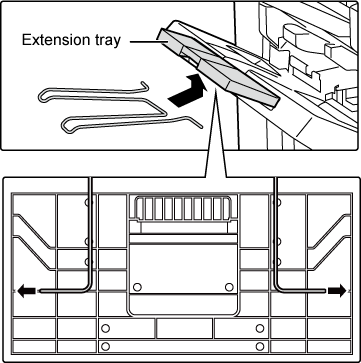
The long paper exit tray is used when discharging
long paper by attaching it to the finisher (large capacity) .
Insert both ends of the long paper exit tray into the holes on the back of the extension tray in the offset tray.
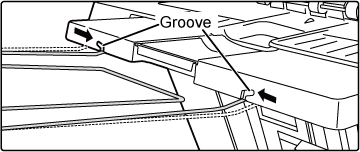
Slightly narrow the width of the long paper exit tray to align it with the groove on the extension tray.
Align the long paper exit tray with the groove and move it upward.
The ends of the long paper exit tray will naturally spread out to the left and right as it follows the groove.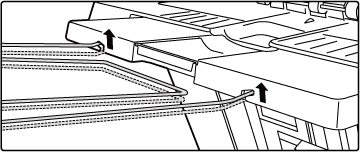
Version 02b / bp80c80_usr_02b_us

