Replace the toner cartridge. When this message appears,
prepare a toner cartridge for replacement. Always replace the toner
cartridge after the "Change the toner cartridge." message appears.
You should keep one set of replacement toner cartridges on hand
so that you can replace a toner cartridge immediately when toner
runs out.

When this message appears, prepare a toner cartridge
for replacement.
(□□□□) shows the color of the toner cartridge that should
be prepared.

If you continue printing, the following message appears.
When this message appears, prepare a toner cartridge for replacement.

If you continue to use the machine, the following message
will appear when the toner runs out.
(□□□□) shows the color of the run out toner cartridge.
Y: Yellow toner, M: Magenta toner, C: Cyan toner, and Bk:
Black toner
Replace the toner cartridge with a one of the relevant color.

Open the toner cover.
(1) Yellow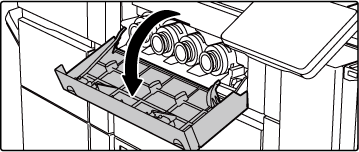
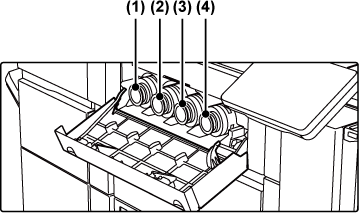
Pull the toner cartridge toward you.
Gently pull out the toner cartridge horizontally.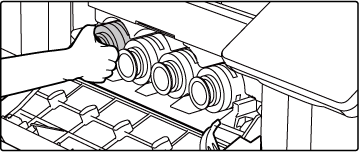
(Example) Replacing the yellow toner cartridge.
Hold the toner cartridge with both hands as shown and slowly pull it out of the machine.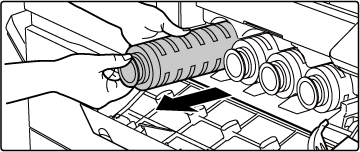
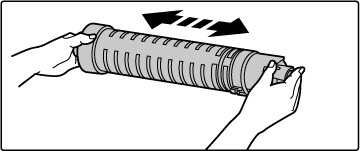
Take a new toner cartridge out of its package and shake it horizontally five or six times.
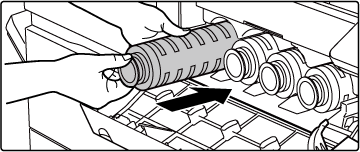
Slowly insert the new toner cartridge on the level.
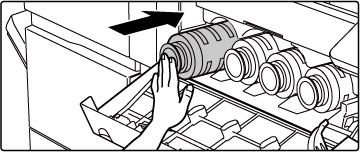
Push the cartridge in until it locks securely in place.
Close the toner cover.
After the toner cartridge is replaced, the machine automatically enters image adjustment mode. Do not open the front cover while this is taking place.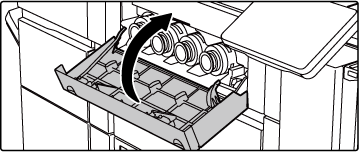
Warning
 " will be displayed alongside colors for which
toner has run out.
" will be displayed alongside colors for which
toner has run out.Version 02b / bp80c80_usr_02b_us

