Automatic exposure adjustment
operates by default to automatically adjust the exposure level and
original type as appropriate for the original being copied. ([Auto]
is displayed.)
This function automatically adjusts the image during black
& white copying to obtain the most suitable copy.
This section explains how to select the
original type depending on the original to be copied or manually
adjust the exposure.
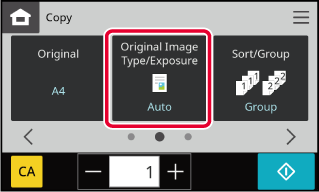
Tap the [Original Image Type/Exposure] key.
COPY MODETap the required original image type key to specify the original type.
Tap the key matching the original.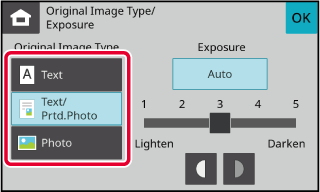
Tap
 to adjust the copy exposure.

Place the colour original.
Place the original in the document feeder tray of the automatic document feeder, or on the document glass.Tap the [Others] key, and tap the [Highlighted Original] key.
A checkmark appears on the icon.Version 01a / bp22m31_usr_01a_en

